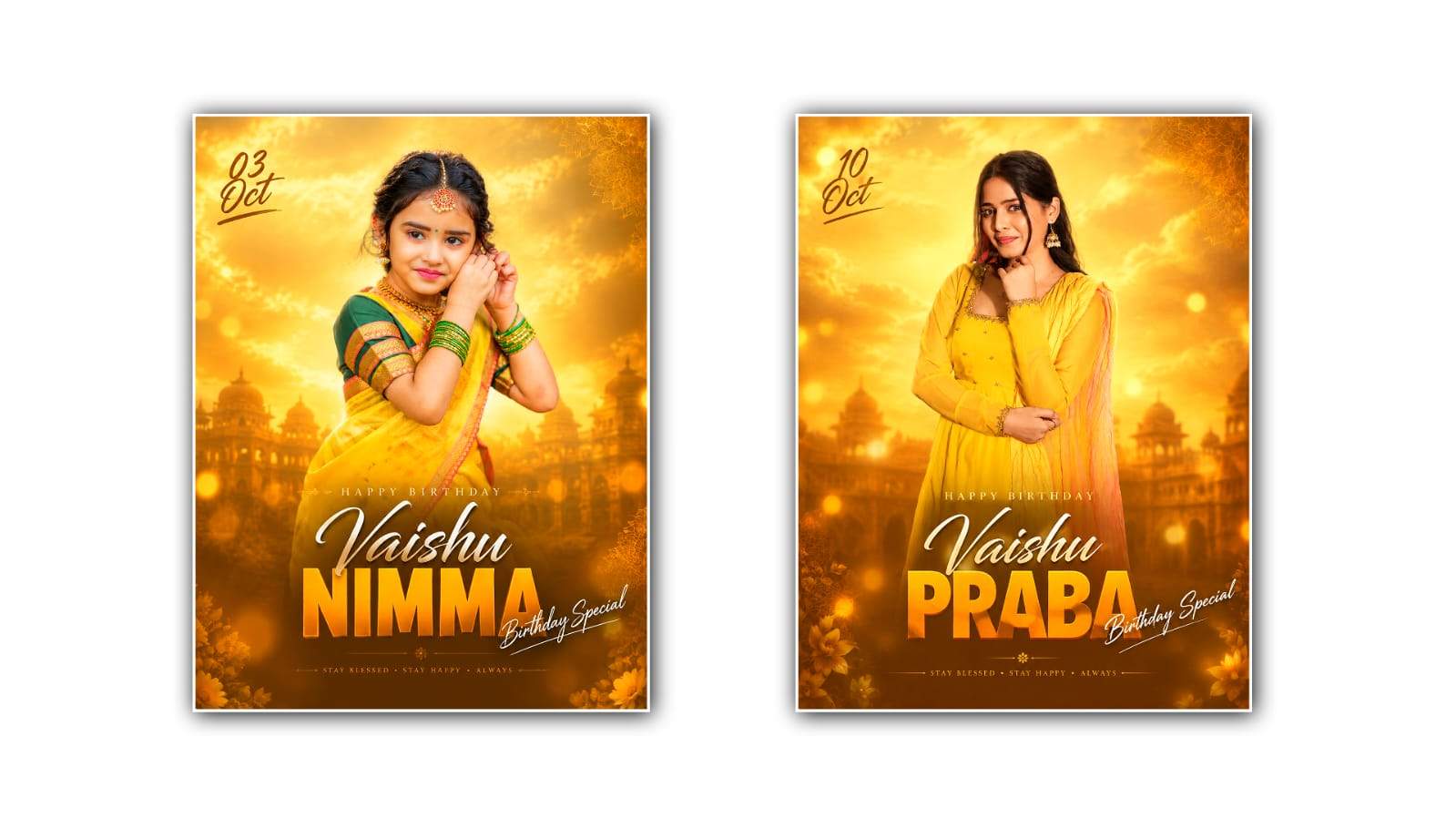

Creating a traditional royal birthday poster can be a great way to make someone’s special day feel more personal and memorable. Instead of using a complicated graphic design application, you can now create an impressive birthday poster with Google Gemini’s help. The process is simple enough for beginners, even if you have little or no photo-editing experience. With the right photo, a clear idea, and a well-written prompt, Gemini can help you turn an ordinary portrait into an elegant royal-style birthday design.
The traditional royal style is all about richness, elegance, and a classic appearance. Think of deep red, maroon, golden, cream, or dark green colours, decorative borders, royal patterns, traditional clothing, palace-inspired backgrounds, and beautiful lighting. You can adjust these elements according to the person’s personality and the type of birthday celebration you are planning. Whether the poster is for a family member, friend, spouse, child, or someone special, the design can be customised to match the occasion.
To begin, choose a good-quality photograph of the birthday person. A clear portrait usually gives better results because Gemini can understand the person’s facial features more easily. Try to select an image where the face is visible and not covered by sunglasses, heavy shadows, or other objects. A front-facing or slightly angled portrait can work particularly well for a royal poster. If the original photo has a simple background, that can also make it easier to transform the overall scene.
Open Google Gemini and use the image creation or image editing feature available in your account. Upload the selected photograph and explain exactly what you want to create. Instead of writing a very short instruction such as “make a birthday poster,” describe the complete visual style. For example, you can ask Gemini to create a traditional royal birthday poster featuring the uploaded person in an elegant royal outfit, surrounded by golden decorative elements, a luxurious palace-inspired background, warm lighting, traditional patterns, and a premium birthday celebration atmosphere.
The more clearly you describe the design, the easier it becomes to get a result close to your idea. Mention the colours, clothing, background, lighting, decorations, pose, and overall mood you want. If you want a traditional Indian royal appearance, you can include details such as an embroidered sherwani, royal turban, saree, lehenga, jewellery, carved palace architecture, traditional lamps, floral decorations, and ornamental gold patterns. These details can give the poster a more cultural and festive appearance.
One important part of the design is the colour combination. Gold works particularly well with traditional royal themes because it creates a luxurious appearance. You can combine gold with maroon, navy blue, emerald green, cream, or deep purple. However, it is usually better not to use too many strong colours at once. A simple combination of two or three main colours can make the poster look more professional. You can also ask Gemini to use warm golden lighting so that the final image has a soft and elegant appearance.
The background can completely change the mood of the poster. For a royal theme, you might choose a grand palace hall, traditional Indian architecture, an ornate royal room, or a decorative backdrop inspired by historical palaces. If you want a simpler design, ask for a luxurious studio background with traditional patterns and golden ornaments. Make sure the background does not become so detailed that it distracts attention from the birthday person.
Typography is another important element. Birthday posters often include text such as “Happy Birthday,” the person’s name, age, or a short birthday message. When asking Gemini to add text, be specific about the wording and placement. You can request large elegant golden lettering at the top and the birthday person’s name underneath. However, AI-generated images can sometimes produce incorrect letters or spelling. If the text is not accurate, you can generate the visual without text and add the final wording later using a graphic design or photo-editing application.
For a more traditional appearance, decorative elements can be added around the edges of the poster. Golden frames, floral motifs, traditional patterns, small lamps, ornamental designs, and subtle light effects can make the composition look richer. Ask Gemini to keep these elements balanced rather than placing decorations everywhere. The birthday person should remain the main focus of the poster.
Another useful approach is to generate the poster in stages. Start with the main portrait and royal transformation. Once you have a design you like, ask Gemini to refine the background colours, lighting, clothing, or decorations. This can be easier than trying to describe every detail in one prompt. If the first result does not look right, don’t worry. Image generation often requires a few attempts before you get the desired result.
You can also experiment with different poster formats. A vertical design is suitable for Instagram Stories, WhatsApp Status, mobile sharing, and digital invitations. A square design can work well for social media posts. If you are planning to print the poster, choose an appropriate high-resolution format and check the final image carefully before printing. The dimensions should match the intended use so that important parts of the design are not cropped.
When creating a royal birthday poster, it is also important to keep the person’s identity recognisable. If you are editing a real person’s photograph, ask Gemini to preserve their facial identity and natural appearance while changing the clothing, background, and overall styling. Avoid requesting unnecessary changes to facial features. A good birthday poster should still look like the person being celebrated rather than like a completely different character.
You can make the design even more personal by adding meaningful details. For example, you could include the person’s favourite colour, a traditional outfit they like, flowers associated with the celebration, or a small decorative symbol connected to their interests. A short message such as “Wishing You a Royal Birthday” can reinforce the theme without overcrowding the poster.
After generating the image, inspect it carefully. Look at the face, hands, clothing, jewellery, background, decorative elements, and text. AI-generated images can sometimes contain small visual mistakes, especially in complicated areas. If you notice something unusual, give Gemini a specific instruction to correct it rather than starting from scratch. For example, you can ask it to maintain the same composition while correcting the hands, improving the facial resemblance, simplifying the background, or making the golden decorations more realistic.
The final step is to save the best version and make any finishing adjustments you need. If the poster contains important written information, check every word and date before sharing it. You can also use another editing application to add perfectly aligned text, logos, borders, or additional design elements after generating the main image.
Creating a traditional royal birthday poster with Google Gemini is therefore less about complicated editing skills and more about having a clear visual idea and explaining it properly. Start with a strong portrait, describe the royal theme in detail, choose a suitable colour palette, add traditional decorations, and refine the result through a few simple edits. With some experimentation, you can create a birthday poster that feels elegant, festive, personal, and suitable for sharing with family and friends. The biggest advantage is that you can explore several different royal styles quickly until you find a design that matches the celebration you have in mind.
IMAGE PROMPT
Create a SAME-TO-SAME premium birthday portrait poster based on the uploaded master reference image. Use the uploaded person photo as the master identity reference. Preserve the exact face, identity, facial features, skin tone, hairstyle, hair texture, makeup, body proportions, saree, blouse, jewelry, pose, expression and overall appearance without any changes. Create the poster in a 4:5 vertical format, ultra-high resolution, photorealistic 8K quality. Recreate the reference design exactly, including the same warm golden-yellow cinematic atmosphere, glowing golden clouds, amber lighting, subtle architectural silhouette, golden haze, dreamy bokeh, soft vignette, decorative floral/mandala details, luxury festive mood, subject framing, composition, spacing, lighting and overall visual hierarchy. Reproduce the complete typography layout from the reference with the same positions, proportions, styles, colors, spacing and overlaps:

* Date: 03 Oct
* Small greeting: HAPPY BIRTHDAY
* Main name: Aaradhy
* Main title: GOUD
* Accent text: Birthday Special

Keep the typography elegant, luxurious and visually identical to the reference. The main name should use the same white handwritten/calligraphy treatment, the main title should use the same large bold orange/golden-orange typography, and the accent text should have the same elegant white handwritten style. The date, name and main title are editable content only. Changing their values must change only the corresponding text while keeping the entire design, person, background, typography style, placement, proportions, lighting, colors and composition unchanged. Do not add any extra text, random letters, additional people, logos, watermarks or unnecessary elements. Do not alter the person's identity, clothing, pose or design.

FINAL RESULT: A premium, photorealistic Indian birthday poster that looks as close as possible to the uploaded reference in every visual aspect, with clean professional finishing and accurate typography.
