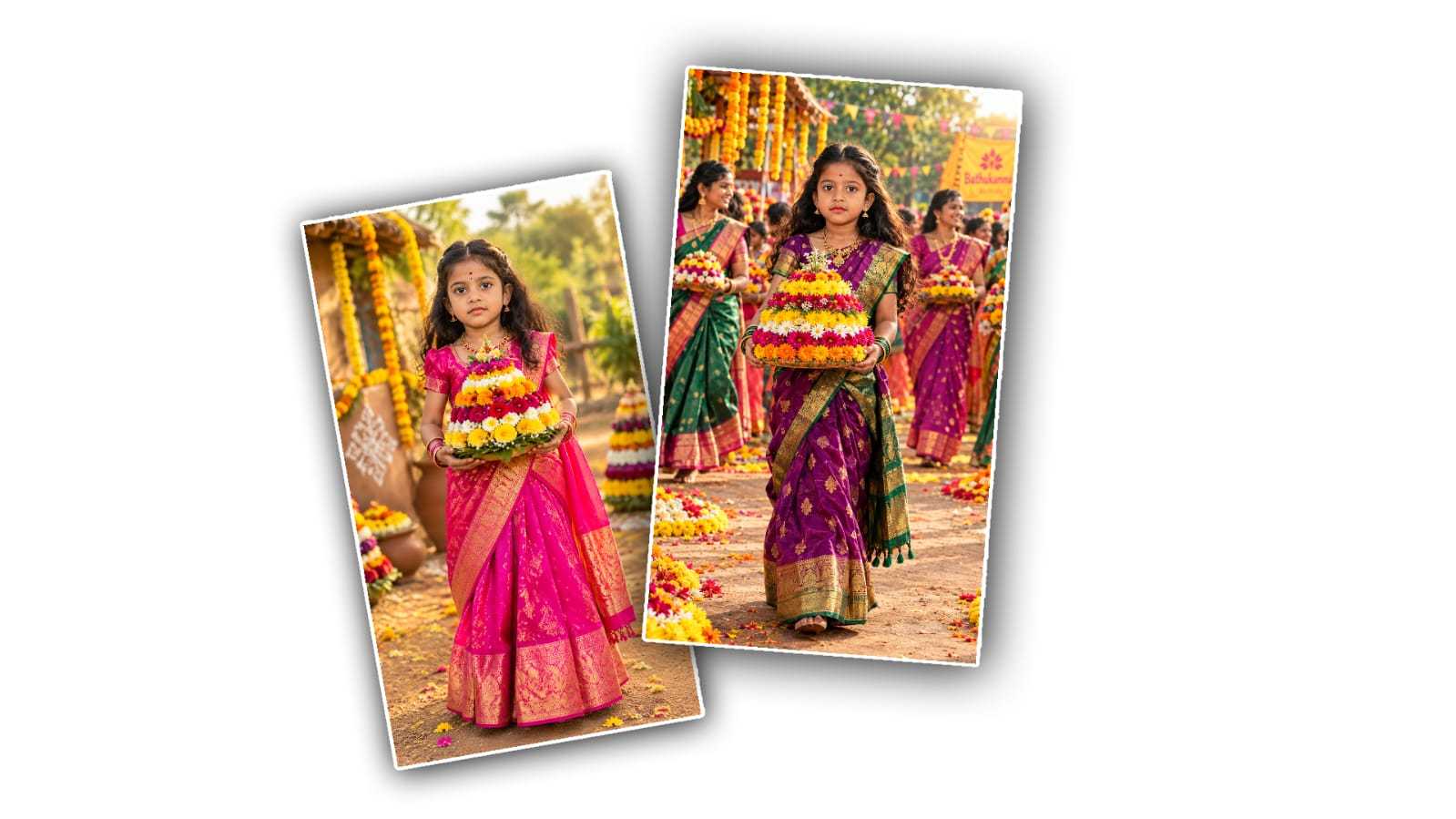

Bathukamma is one of Telangana’s most beautiful and colourful festivals. It’s known for its beautiful flower arrangements, traditional dresses, music, dancing, and the joyful atmosphere shared with family and friends. With the growth of AI photo editing tools, you can now create a beautiful Bathukamma-themed photo using your own picture without needing advanced editing skills.
Google Gemini can help you transform an ordinary personal photo into a festive Bathukamma image by using a carefully written AI prompt. You can upload your photo, describe the kind of festival scene you want, and let Gemini create an edited image based on your instructions.
In this guide, we will explain how to create a Bathukamma Festival photo edit with your own photo in Google Gemini, along with useful prompt ideas and tips for getting a natural-looking result.
What Is Bathukamma Festival Photo Editing?
Bathukamma photo editing means creating or transforming a photograph to give it a Bathukamma festival theme. The final image can include colourful flowers, a traditional Telangana setting, festive decorations, traditional clothing, lamps, and a beautifully arranged Bathukamma in the background.
Instead of manually adding each element in Photoshop or another editing application, AI tools can generate or modify many of these details from a simple text instruction.
The best part is that you can use your own photo as the main subject. This makes the final image more personal and suitable for sharing on social media, WhatsApp, Instagram, Facebook, or as a festive greeting.
What You Need Before Starting
Before creating your Bathukamma photo, keep a few things ready.
-
A clear photo of yourself
-
Access to Google Gemini
-
A good Bathukamma editing prompt
-
A stable internet connection
-
A little patience if you need to regenerate the image
For the best results, choose a photo where your face is clearly visible. A well-lit image with good resolution usually gives AI editing tools more information to work with.
How to Create Bathukamma Photo Editing in Google Gemini
Step 1: Open Google Gemini
First, open Google Gemini on your phone or computer and sign in if required.
Start a new conversation and look for the option that allows you to upload an image. The exact buttons and features may change over time, so the interface you see may be slightly different.
Step 2: Upload Your Own Photo
Select a photo from your phone gallery or computer.
Try to use a photo that is:
-
Clear and high quality
-
Not heavily filtered
-
Well lit
-
Showing your face clearly
-
Free from objects covering your face
If you want a full-body festive image, a photo showing more of your body can also be useful.
Step 3: Write a Detailed Bathukamma Prompt
After uploading your image, describe exactly how you want the final picture to look.
Instead of simply writing “make this a Bathukamma photo,” give Gemini more information about the clothing, background, flowers, lighting, pose, and overall mood.
For example, you can use a prompt like this:
Prompt:
“Transform my uploaded photo into a beautiful traditional Bathukamma festival scene. Keep my face and identity natural and recognizable. Dress me in an elegant traditional Telangana outfit with colorful festive details. Place a beautifully arranged Bathukamma made with vibrant seasonal flowers in front of me. Create a traditional Telangana village-style festive background decorated with flowers and warm lamps. Add a joyful evening festival atmosphere, soft golden lighting, realistic skin texture, natural facial details, and high-quality photography. Make the image look realistic, elegant, colorful, and suitable for a Bathukamma festival celebration. Do not unnecessarily change my facial features.”
This type of prompt gives the AI a much clearer idea of what you want.
Step 4: Mention Your Preferred Dress
Traditional clothing can make the image look much more festive.
For women, you can ask for a traditional saree, half-saree, or another festive Telangana-inspired outfit. You can specify colours such as pink, yellow, green, red, orange, or blue.
For men, you can request a traditional kurta, dhoti, or other suitable festive clothing.
For example:
“Change my outfit to an elegant traditional Telangana festive saree in bright pink and yellow colors, while keeping my face and natural appearance unchanged.”
You can adjust the colours according to your preference.
Step 5: Add a Beautiful Bathukamma Background
The background plays an important role in making the image look authentic.
You can ask Gemini to create a colourful Bathukamma arrangement surrounded by flowers, traditional decorations, lamps, and people celebrating the festival.
For example:
“Create a realistic Bathukamma festival background with colorful flower arrangements, traditional decorations, warm oil lamps, and a joyful evening celebration.”
If you prefer a simple portrait, you can ask for a clean background instead:
“Create a simple elegant Bathukamma setup behind me with a large colorful flower Bathukamma, soft lights, and a traditional festive atmosphere.”
Step 6: Ask for a Realistic Look
Sometimes AI-generated images can look overly artificial. To make the result more natural, include words such as:
-
Photorealistic
-
Natural skin texture
-
Realistic facial features
-
Natural lighting
-
High-resolution photography
-
Realistic fabric details
-
Authentic festive atmosphere
You can also specifically tell Gemini not to change your identity.
For example:
“Preserve my original facial structure, skin tone, hairstyle, and recognizable identity. Make only the requested changes to the clothing and surroundings.”
This can help reduce unnecessary changes to your appearance.
Step 7: Generate and Review the Image
After entering your prompt, ask Gemini to create the edited image.
Take a moment to check the result carefully. Look at your face, hands, clothing, flowers, and background.
If something doesn’t look right, you don’t necessarily need to start from the beginning. You can give Gemini another instruction asking it to correct the specific problem.
For example:
“Keep the current image, but make my face look more natural and preserve the original facial features. Also improve the details of the Bathukamma flowers.”
Small follow-up instructions can sometimes produce a better result than writing a completely new prompt.
Best Bathukamma AI Photo Editing Prompt
If you want a more elaborate festive image, try this prompt:
“Use my uploaded photo as the main subject and create a realistic Bathukamma festival portrait. Preserve my identity, facial features, natural skin tone, and overall appearance. Dress me in an elegant traditional Telangana outfit with beautiful festive colours and realistic fabric details. Place a colourful Bathukamma flower arrangement beside me, made with vibrant traditional flowers. Create a beautiful Telangana-inspired festive environment with flower decorations, warm oil lamps, subtle traditional elements, and a joyful evening atmosphere. Use cinematic but natural lighting, realistic shadows, detailed flowers, natural skin texture, and professional photography quality. The final image should look like a real photograph taken during Bathukamma celebrations, not like an artificial or cartoon image.”
ALL PROMPTS
PROMPT 1
Transform the uploaded person photo into a highly realistic Telangana Bathukamma festival portrait. Preserve the person's exact facial identity, facial features, hairstyle and natural expression without alteration. Dress the person in an elegant traditional Telangana silk saree featuring a rich fabric texture, detailed gold border, authentic traditional jewelry and matching bangles. Show the person standing in a graceful side-facing pose, gently looking toward a beautifully arranged Bathukamma flower stack held naturally in both hands. Include vibrant seasonal flowers, a traditional village festival setting, soft natural sunlight and cinematic DSLR photography. Make the complete body visible from head to toe with the entire outfit clearly shown, professional portrait quality, vertical 9:16 composition.

Do not change the face, do not change the hairstyle, do not change the age, do not create a different person, no artificial-looking face, no cartoon style, no blurry details, no extra fingers, no cropped body, no modern western clothing.
PROMPT 2
Create a highly realistic full-body Telangana Bathukamma festival portrait using the uploaded person image. Maintain the exact facial identity, original facial features and hairstyle. Dress the person in a beautiful traditional half saree or elegant silk saree with authentic Telangana-style ornaments and jewelry. Show the person gracefully carrying a colorful Bathukamma flower arrangement on the head in a traditional festival pose with a natural and elegant posture. Add a charming village environment, decorated festival streets, colorful flowers and warm golden-hour lighting. Use ultra-realistic professional DSLR photography with natural skin texture, full-length framing and a vertical 9:16 composition.

Do not change the face, do not change the hairstyle, do not change the age, do not create a different person, no artificial-looking face, no cartoon style, no blurry details, no extra fingers, no cropped body, no modern western clothing.
PROMPT 3
Convert the uploaded person photo into a realistic Telangana Bathukamma flower-preparation scene. Preserve the person's original face, facial identity and hairstyle exactly as provided. Dress the person in a traditional festive Telangana outfit with elegant jewelry and cultural details. Show the person sitting naturally on the floor while carefully arranging colorful flowers layer by layer to create a beautiful Bathukamma. Include flower baskets, fresh marigold flowers, a traditional home courtyard, festive decorations and an authentic Telangana household atmosphere. Capture the scene in a natural candid photography style with realistic textures, professional DSLR quality and detailed surroundings. Keep the full body visible and use a vertical 9:16 composition.

Do not change the face, do not change the hairstyle, do not change the age, do not create a different person, no artificial-looking face, no cartoon style, no blurry details, no extra fingers, no cropped body, no modern western clothing.
PROMPT 4
Transform the uploaded person photo into a traditional Telangana Bathukamma celebration portrait. Preserve the original facial identity, hairstyle, facial features and natural appearance without modification. Dress the person in a beautiful red and golden silk saree with an elegant gold border, traditional Telangana jewelry and festive accessories. Show the person sitting gracefully beside a large beautifully decorated Bathukamma placed on the ground, creating a natural traditional festival moment surrounded by colorful flowers. Add an authentic Telangana village environment, warm natural sunlight and cinematic realistic photography. Keep the entire body visible with a complete outfit and use a vertical 9:16 portrait composition.

Do not change the face, do not change the hairstyle, do not change the age, do not create a different person, no artificial-looking face, no cartoon style, no blurry details, no extra fingers, no cropped body, no modern western clothing.
PROMPT 5
Create a professional and highly realistic Telangana Bathukamma festival photoshoot using the uploaded person image. Preserve the person's exact face identity, facial features and hairstyle without any changes. Dress the person in a distinctive traditional silk saree, choosing rich festive colors such as purple, green or maroon, with detailed gold embroidery and traditional jewelry. Show the person gracefully walking during a Bathukamma celebration while naturally carrying a colorful Bathukamma flower arrangement in both hands. Add other women celebrating in the background, vibrant floral decorations, traditional festival details and a lively festive atmosphere. Capture the image with cinematic DSLR quality, realistic natural lighting and detailed skin texture. Show the complete body from head to toe in a vertical 9:16 composition.

Do not change the face, do not change the hairstyle, do not change the age, do not create a different person, no artificial-looking face, no cartoon style, no blurry details, no extra fingers, no cropped body, no modern western clothing.
PROMPT 6
Use the uploaded person photo to create a premium and highly realistic Telangana Bathukamma festival portrait. Keep the person's original face, facial features, hairstyle and identity completely unchanged. Dress the person in a royal traditional Telangana outfit featuring an elegant silk saree, refined temple jewelry, decorative bangles and fresh flowers arranged beautifully in the hair. Place a beautifully decorated Bathukamma beside the person and show them in a graceful traditional festival pose with a natural smile and confident posture. Add colorful floral decorations, an authentic village celebration environment and cinematic lighting. Create an ultra-realistic professional photography look with natural skin details and realistic fabric textures. Keep the entire body visible from head to toe and use a vertical 9:16 composition.

Do not change the face, do not change the hairstyle, do not change the age, do not create a different person, no artificial-looking face, no cartoon style, no blurry details, no extra fingers, no cropped body, no modern western clothing.
