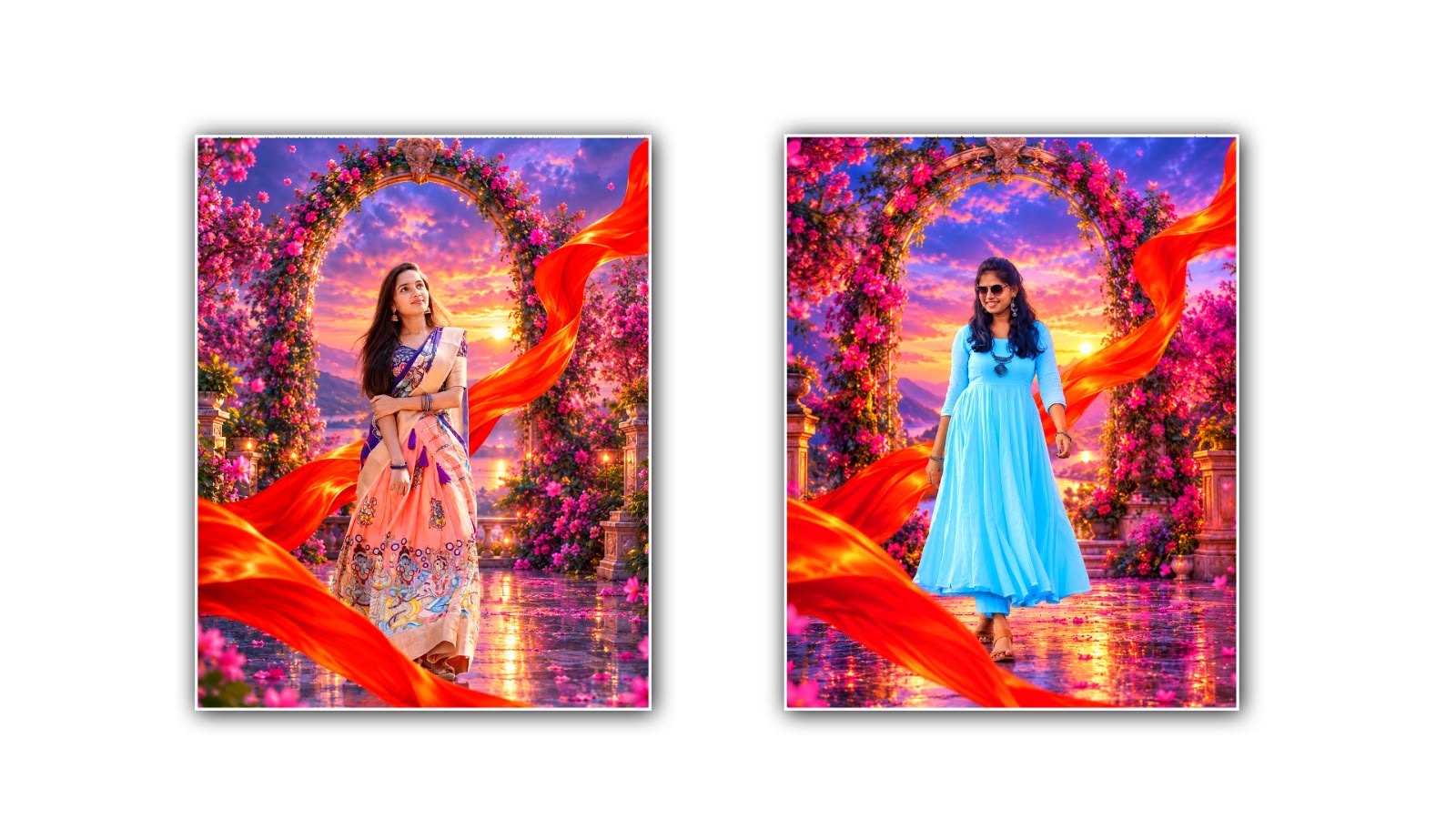

Creating a beautiful fantasy background photo with the help of Google Gemini is becoming a popular trend among people who love photography, creative editing, and social media content. With the power of artificial intelligence, anyone can transform an ordinary photo into a magical and eye-catching image without spending hours learning complicated photo editing software. Whether you want to create a dreamy cinematic portrait, a fantasy forest scene, a glowing sky, a royal background, or a stunning image with magical lighting, Google Gemini can help you bring your creative ideas to life with the right instructions.
The best thing about AI fantasy background photo editing is that you do not always need a professional camera or an expensive computer. A normal photo captured using a smartphone can become the starting point for an impressive fantasy-style image. By uploading your picture and describing the background you want, you can explore different creative styles and turn your imagination into a visual result. However, the quality of the final image depends on several factors, including the original photo, the prompt you write, and the details you ask the AI to preserve.
To get started, open Google Gemini in your browser or use the Gemini app on your smartphone. Sign in with your Google account if required, and look for the option to upload an image or create and edit images. The available features may vary depending on your account, region, and the version of Gemini you are using. Choose a clear photograph that you want to transform. A portrait with a visible face, good lighting, and a simple background is often a good choice for beginners because it allows the AI to work more easily with the main subject.
After selecting your photo, upload it to Gemini and explain exactly how you want the image to look. Instead of simply writing “change my background,” provide a detailed description of the scene, lighting, colours, atmosphere, and overall photography style. For example, you could ask Gemini to transform your ordinary portrait into a cinematic fantasy photograph featuring a magical forest, glowing flowers, floating particles, soft golden light, and a beautiful sunset in the distance. You can also request realistic skin texture, natural facial features, detailed clothing, and professional photographic quality.
Writing a good prompt is one of the most important parts of creating the best AI fantasy background photo. The more clearly you describe your idea, the easier it becomes to guide the result toward your preferred style. Try to explain not only what should appear in the background but also how the subject should look within the scene. Mention the lighting direction, background depth, colour combination, camera perspective, and mood. These small details can make a significant difference in the final image.
For example, if you want to create a fantasy portrait with a magical blue background, you can use a prompt like this: “Edit the uploaded photo into a highly realistic cinematic fantasy portrait. Keep the person’s original face, facial identity, hairstyle, natural skin texture, and body proportions unchanged. Replace the existing background with a magical blue fantasy world featuring glowing waterfalls, misty mountains, sparkling particles, and soft moonlight. Add realistic shadows, balanced lighting, natural depth of field, detailed textures, and professional DSLR photography quality. Make the background blend naturally with the subject and avoid artificial-looking effects.”
This type of prompt gives Gemini a clear direction while explaining which parts of the original photo should remain consistent. If you prefer a different atmosphere, you can replace the blue fantasy world with a golden palace, a mysterious forest, a dreamy cloud kingdom, or a dramatic sunset landscape. The main idea is to describe the image you want to see instead of relying on a short and general instruction.
Another popular style is the royal fantasy background, which can make a simple portrait look elegant and cinematic. Imagine standing in front of a grand palace with beautiful golden pillars, glowing chandeliers, marble stairs, and warm cinematic lighting. To create this effect, upload your photograph and ask Gemini to place you in a luxurious fantasy palace while preserving your original appearance. You can request realistic shadows, detailed architecture, soft highlights, and a balanced composition so that the background looks like part of the original photograph rather than a separate image.
Nature-inspired fantasy backgrounds are also a great option for people who enjoy peaceful and dreamy visuals. A portrait surrounded by green mountains, glowing butterflies, magical trees, colourful flowers, and soft morning mist can create a beautiful atmosphere. For a more realistic result, ask Gemini to use natural sunlight, subtle fantasy elements, realistic environmental textures, and a background that matches the perspective of your original photo. This approach helps maintain a balance between imagination and photography.
If you want to create a dramatic fantasy image for Instagram, Facebook, or other social media platforms, experiment with cinematic lighting and vibrant colours. A dark background with glowing blue and purple lights, floating particles, distant mountains, and a soft light source behind the subject can create a powerful visual effect. You can also try a fiery orange sunset, a galaxy-inspired sky, or a futuristic fantasy city. Remember that adding too many effects can sometimes make the picture look unrealistic, so it is usually better to focus on a few strong visual elements.
Once Gemini generates the edited image, take a moment to examine the result carefully. Check whether the face still looks natural, the hands and fingers appear correct, the clothing details are consistent, and the lighting matches the background. Sometimes AI image editing can introduce unwanted changes to facial features, accessories, body proportions, or small details. If something does not look right, you do not necessarily need to start again. You can send a follow-up instruction asking Gemini to correct the specific problem while keeping the rest of the image unchanged.
For instance, if the background looks beautiful but your face has changed, you can write, “Please refine this image while preserving the original person’s facial identity, expression, hairstyle, and natural skin texture. Keep the existing fantasy background and lighting, and correct only the facial details that look different.” Similarly, if the background appears too bright, ask Gemini to reduce the brightness and adjust the shadows to match the subject. Giving small, focused instructions often makes the editing process easier than changing everything at once.
It is also worth trying several different prompts for the same photograph. One version might feature a magical forest, another might use a royal palace, and a third might create a dreamy celestial background. Comparing these variations can help you discover which style works best with your clothing, pose, and original lighting. You can also experiment with warm colours for a romantic appearance, cool colours for a mysterious atmosphere, or soft pastel shades for a gentle and dreamy look.
For the most professional result, begin with a high-quality original photograph. Make sure your face is clearly visible and avoid images that are extremely blurry, heavily filtered, or poorly lit. Choose a background concept that complements your clothing and pose, and explain how the light should fall on your face and body. If you want a realistic photograph, use words such as natural skin texture, realistic lighting, accurate shadows, detailed environment, and cinematic photography. If you want a more imaginative result, include magical elements without forgetting to describe how they should blend into the scene.
After you are satisfied with the final image, use the available download or save option to keep a copy on your device. You can then crop the image for your preferred social media platform or make minor adjustments to brightness, contrast, and sharpness using a photo editor. Avoid applying too many extra filters, as they may reduce the natural appearance that makes the AI-generated image attractive.
Creating the best AI fantasy background photo editing in Google Gemini is ultimately about combining imagination with clear instructions. You do not need to be an expert photographer to experiment with magical landscapes, cinematic portraits, royal backgrounds, or dreamy fantasy scenes. Start with a good photograph, describe your vision in detail, review the generated result, and improve it through simple follow-up prompts. With a little patience and creativity, you can turn an ordinary picture into a visually stunning fantasy portrait that reflects your personal style and stands out on social media.
IMAGE PROMPT
SAME-TO-SAME PREMIUM FANTASY BACKGROUND — 4:5 IMAGE GENERATION PROMPT
Create an ultra-realistic, premium cinematic fantasy portrait in 4:5 portrait ratio (4096 × 5120 resolution), using ONLY the uploaded person's photo as the identity reference. Generate the entire fantasy background from the descriptions below. No additional reference image is required.
1. PERSON — STRICT IDENTITY & OUTFIT LOCK
Preserve the uploaded person's original face, identity, hairstyle, hair texture, skin tone, expression, clothing, clothing colors, patterns, accessories, body proportions, and original pose exactly. Do not replace or redesign any part of the person's appearance. Adapt the background around the person naturally.
2. DREAMY PURPLE-BLUE FANTASY BACKGROUND
Create a magical deep-blue and violet sky with soft purple gradients, pastel-pink clouds, and a glowing golden-pink sunset. Add a large, ornate oval stone arch behind the person, decorated with antique carvings, deep-pink flowers, magenta blossoms, and lush flowering vines. Include dense pink flowering trees on both sides, elegant stone pillars, garden terraces, and a dreamy distant landscape. Add glossy reflective flooring with warm sunset reflections, scattered pink petals, floating particles, soft bokeh, and atmospheric depth. Maintain the vibrant purple, blue, pink, and magenta color palette.
3. DRAMATIC RED-ORANGE SILK RIBBON
Create a large, flowing red-orange silk ribbon entering from the lower-left foreground, sweeping across the bottom, curving upward behind and to the right of the person, and flowing toward the upper-right corner. Include realistic fabric folds, rich red tones, bright orange-gold highlights, silky reflections, natural curves, and strong cinematic depth. Preserve the ribbon's dramatic shape and placement without covering the person's face or significantly hiding their outfit.
4. COMPOSITION & CAMERA
Vertical 4:5 portrait composition. Position the person naturally within the fantasy environment while preserving their original pose and proportions. Frame the person with the ornate floral oval arch. Maintain balanced composition, realistic perspective, atmospheric depth, and the same premium fantasy aesthetic. Avoid awkward cropping, stretching, or distorted anatomy.
5. LIGHTING & QUALITY
Premium cinematic sunset lighting, soft golden rim light, realistic silk reflections, detailed floral textures, natural skin texture, accurate clothing details, vibrant yet balanced color grading, glossy reflective flooring, high dynamic range, professional compositing, photorealistic details, and 8K-quality finish.
6. STRICT NEGATIVE PROMPT
No text, no typography, no logos, no watermark, no extra people, no face changes, no identity changes, no hairstyle changes, no clothing changes, no color or pattern changes to the original outfit, no added or removed accessories, no pose alterations, no body distortion, no extra limbs, no duplicated body parts, no missing floral arch, no missing red-orange ribbon, no different background style, no cartoon effects, no blurry details, no unnatural skin, no excessive beauty filters.
FINAL REQUIREMENT
Generate the complete fantasy background using ONLY the uploaded person's photo and this written prompt. Preserve the person's original appearance and outfit without changes. Recreate the ornate pink floral oval arch, dreamy purple-blue sky, glowing golden-pink sunset, pink flowers, reflective ground, floating petals, cinematic lighting, and dramatic red-orange silk ribbon. Remove all text completely. The final result must maintain the same premium fantasy design and visual effects in 4:5 portrait format.
