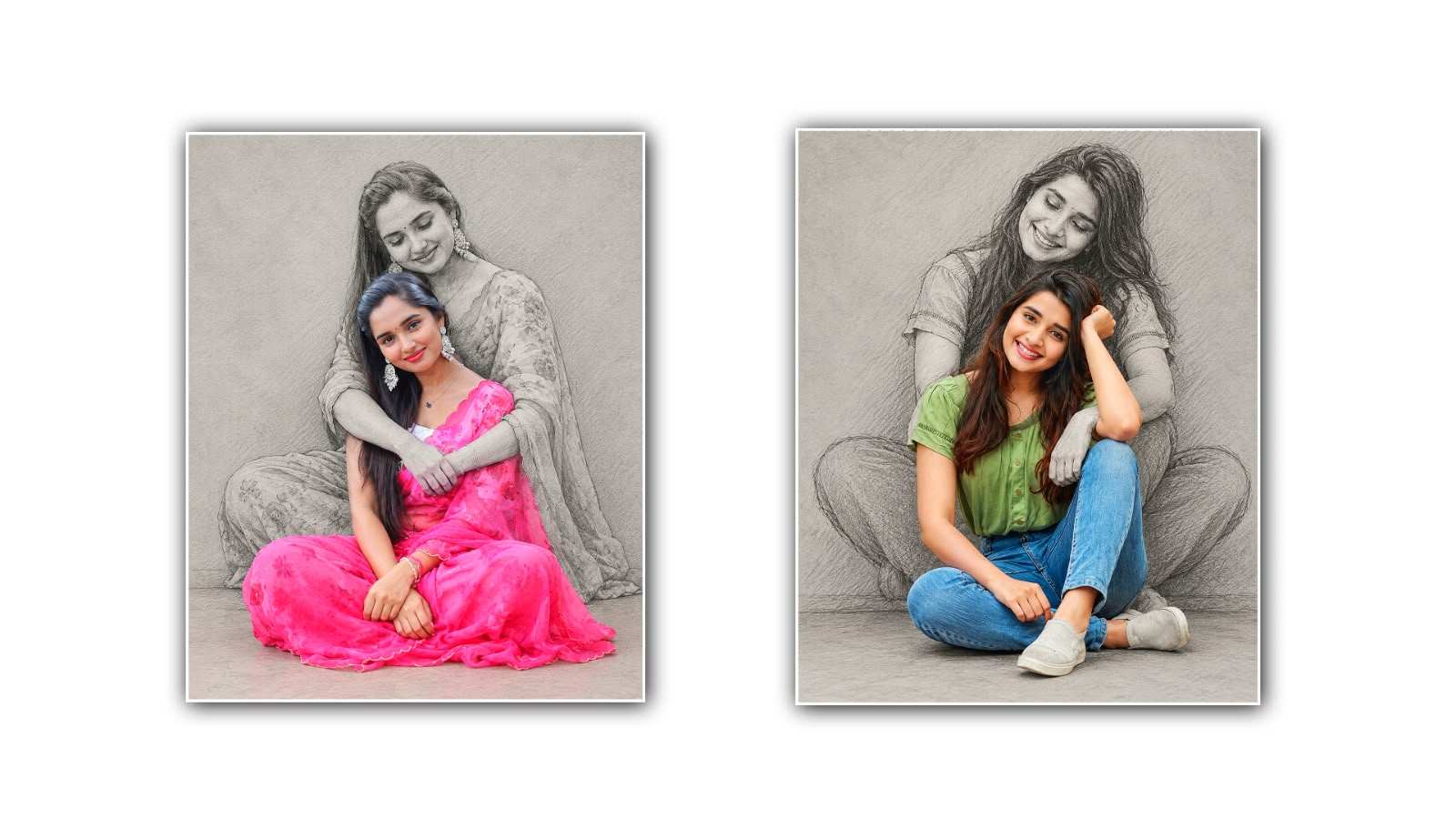

Self Hug Sketch Effect Photo Editing in Google Gemini is becoming a popular creative trend among people who love turning their ordinary photos into something emotional, artistic, and beautiful. In today’s digital world, photo editing is not just about improving brightness, changing colours, or adding filters. People want their pictures to tell a story and express feelings that are sometimes difficult to explain in words. The self hug sketch effect is one such creative idea that combines the beauty of a real photograph with the charm of a hand-drawn sketch, creating an image that feels personal and meaningful.
The most special thing about this editing trend is the emotion behind it. A self-hug represents love, comfort, peace, and the importance of caring for yourself. In a busy life, people often spend so much time thinking about others that they forget to give themselves the same kindness. A picture showing a person hugging themselves can represent self-love, healing, confidence, and emotional strength. When this idea is transformed into a soft sketch-style image with the help of Google Gemini, the result can look like a beautiful illustration made by an artist.
Google Gemini is an AI-powered tool that can help users create and transform images using written instructions. Instead of spending hours learning complicated editing software, users can describe the style they want and let the AI help bring their ideas to life. Depending on the features available in their version of Gemini, users may be able to upload a photograph, provide an editing prompt, and generate an image that follows the requested artistic style. This makes the self-hug sketch effect an interesting option for beginners as well as people who enjoy experimenting with different photo editing trends.
To create this effect, the first step is to choose a suitable photograph. A clear picture with good lighting usually works better because the AI can understand the person’s face, hairstyle, clothing, and body position more easily. You can choose a portrait, a standing photo, or a picture in which your face and upper body are clearly visible. If you want the final image to look natural, select a photograph with a simple background and a relaxed expression. A clean original image gives the AI a better starting point for creating a sketch-inspired result.
After selecting your photograph, open Google Gemini and look for the image upload or image editing option available to you. Upload the picture you want to transform and explain the effect clearly. The most important part of this process is writing a detailed prompt. Simply asking for a sketch may produce a basic drawing, while describing the emotional feeling, artistic style, lighting, and background can help guide the result toward your preferred look.
For example, you can use a prompt such as: “Transform this uploaded photo into a beautiful, emotional self-hug sketch illustration. Preserve the person’s recognisable facial features, hairstyle, clothing, and natural appearance. Create a gentle scene in which the person is embracing themselves with both arms in a comforting and peaceful pose. Use delicate pencil strokes, soft graphite shading, subtle paper texture, and a clean white background. Keep the composition minimal, elegant, and realistic, with a hand-drawn artistic finish. Make the image feel warm, emotional, and full of self-love. Avoid excessive colours, heavy shadows, distorted hands, and unnecessary background details.”
You can adjust this prompt according to your own imagination. If you prefer a romantic and dreamy appearance, request soft pastel shades and gentle lighting. If you like traditional artwork, ask for a black-and-white pencil sketch with fine outlines and realistic shading. For a modern social media look, you can request a minimal illustration with a plain background and a few subtle artistic details. Small changes in the prompt can create different visual moods, allowing you to experiment until you find a style that matches your personality.
One of the most attractive aspects of theself-hugg sketch effect is the way it combines simplicity with emotion. A normal photograph captures a moment, but a sketch can give that moment a different meaning. The delicate lines around the face, the soft shading on the clothes, and the gentle placement of the arms can make the image feel like a page from a personal diary. Rather than looking like an ordinary edited picture, the final artwork can communicate a message about accepting yourself, appreciating your journey, and finding happiness within.
However, getting the perfect result may require more than one attempt. Sometimes AI-generated images may change facial details, create unusual fingers, alter clothing, or interpret the requested pose differently from what you imagined. If the first result does not look right, you can provide a follow-up instruction explaining what needs to be improved. For example, you can ask Gemini to keep the original facial features more accurately, make the hands look natural, simplify the background, or use thinner pencil strokes. Giving specific feedback is often more useful than repeating the entire prompt without explaining the problem.
It is also important to remember that AI image editing does not always preserve every detail of the original photograph. If your main goal is to maintain your exact appearance, carefully compare the generated image with your uploaded photo before sharing it. You can try different prompts, use a clearer reference image, or choose a less stylised effect if the sketch changes your face too much. The available editing controls and results may vary depending on the version of Google Gemini you use, so the process might not look the same for everyone.
Once you are happy with the final image, you can save it if the available options allow it and use it in different creative ways. Many people enjoy sharing artistic portraits on Instagram, Facebook, WhatsApp, and other social media platforms. You can also use the picture as a profile image, a personal wallpaper, or a visual reminder to treat yourself with kindness. Adding a short caption such as “Learning to be my own comfort,” “A little love for myself,” or “Sometimes, you need your own hug” can make the post even more meaningful.
Another reason this trend attracts attention is that it does not require professional photography equipment or advanced drawing skills. Anyone with a suitable photograph, a little creativity, and access to compatible AI image features can explore the idea. You can experiment with different poses, backgrounds, sketch styles, and emotional expressions to create artwork that feels unique to you. The goal is not necessarily to produce a technically perfect drawing but to create an image that reflects your feelings and creative vision.
While using AI tools, always remember to upload photographs responsibly. Use images that you have permission to edit, especially when they include other people. Avoid sharing private or sensitive pictures without consent, and review the privacy settings and applicable terms of the service before uploading personal images.
Ultimately, Self Hug Sketch Effect Photo Editing in Google Gemini is more than just another photo editing trend. It is a creative way to turn a simple photograph into an expressive piece of digital art. With a clear reference image, a well-written prompt, and a little patience, you can explore different sketch effects and create a result that feels personal, beautiful, and emotionally meaningful. Whether you want to follow a social media trend, try AI photo editing for the first time, or create a picture that represents self-love, this effect offers an enjoyable way to combine technology with creativity. Sometimes, the most beautiful picture is not the one with the most complicated edits, but the one that reminds you to appreciate yourself just as you are.
IMAGE PROMPT
Create a highly realistic 4:5 portrait using the uploaded person's photo as the ONLY identity reference.

DESIGN: Recreate the exact artistic style of a realistic color portrait in the foreground with a large, detailed black-and-white pencil sketch of the same person behind them. The background sketch should show the person sitting behind the colored subject, gently hugging them from behind with both arms wrapped naturally around their shoulders and upper body. The foreground person sits cross-legged on the floor, with hands resting naturally near the knees or in the lap. Use a simple light-grey textured wall and floor, realistic soft lighting, detailed graphite shading, fine pencil strokes, and a natural studio-photography finish.

STRICT IDENTITY LOCK: Preserve the uploaded person's exact facial identity, face shape, eyes, eyebrows, nose, lips, smile, skin tone, hairstyle, hair texture, hair color, age, and body proportions. Do not beautify, redesign, replace, or alter the face or hair.

CLOTHING LOCK: Keep the exact original outfit from the uploaded photo, including clothing type, colors, patterns, fit, and accessories. Do not replace or recolor the outfit. Keep the foreground person fully photorealistic and in natural original colors. Convert only the background duplicate into a highly detailed monochrome pencil sketch of the same person.

COMPOSITION: Match the reference layout, with the colored person sitting in front and the oversized pencil-sketch version positioned directly behind them, creating a natural protective hug. Maintain realistic anatomy, correctly positioned arms and hands, natural proportions, and accurate facial details.

QUALITY: Ultra-realistic photography, professional graphite sketch, intricate hair details, natural shadows, seamless blending, high resolution, 4:5 aspect ratio.

NEGATIVE INSTRUCTIONS: No face changes, no hairstyle changes, no clothing changes, no identity swapping, no extra people, no extra fingers, no deformed hands, no distorted anatomy, no cartoon effect, no artificial skin, no text, no logos, no watermark.
