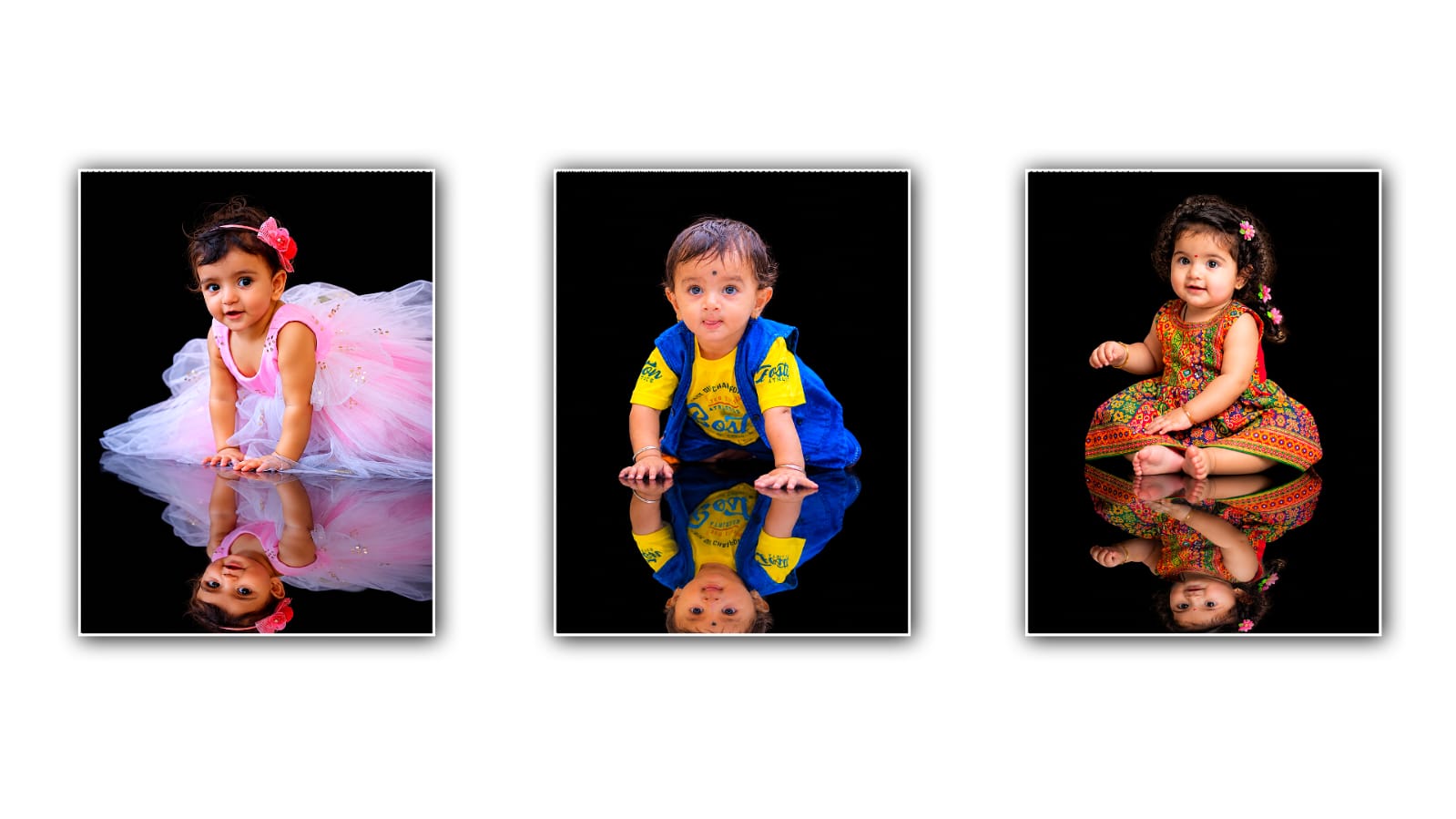

Creating cute and creative baby photos has become much easier with AI image tools, and one of the most popular ideas right now is the baby mirror effect photo. This style creates an adorable scene where a baby appears to be looking at their reflection in a mirror, often with a soft, dreamy, realistic, and professional photography look. You do not need advanced photo-editing skills to create this type of image. With Google Gemini, you can turn a simple baby photo into a beautiful mirror-effect image by using the right image and a detailed prompt.
The first thing you need is a suitable baby photo. A clear, high-quality picture usually gives better results because Gemini needs enough visual information to understand the baby’s face, clothing, pose, and overall appearance. Try to choose a photo where the baby’s face is clearly visible, and there is enough of the body or surrounding area in the frame. A front-facing or slightly side-facing photo can work particularly well for this kind of transformation. If your original photo is blurry, extremely dark, or heavily edited, the final result may not look as natural.
Once you have selected your photo, open Google Gemini and use its image-generation or image-editing feature, depending on what is available in your account and region. Upload the baby photo and explain exactly what you want to change. The most important part of creating a good AI image is the prompt. Instead of writing only something like “make a baby mirror photo,” describe the scene, lighting, clothing, mirror, background, pose, and photography style.
For example, you can use a prompt like: “Create a realistic and adorable baby mirror effect photo using the uploaded image as the reference. Keep the baby’s facial features, skin tone, hairstyle, and overall identity consistent. Show the baby sitting or standing in front of a beautiful full-length mirror, with the baby naturally looking toward their reflection. Make the reflection match the baby’s appearance and position accurately. Use soft natural lighting, a warm, cosy room, subtle pastel colours, realistic shadows, detailed skin texture, and professional baby photography. Keep the image photorealistic, sweet, elegant, and natural.”
The wording can be changed depending on the style you want. If you want something more luxurious, you can describe a stylish room with warm lighting, elegant furniture, and a large decorative mirror. If you prefer a simple social-media style, ask for a clean room, soft daylight, neutral colours, and minimal decorations. The more clearly you describe your idea, the easier it is for the AI to understand the visual result you are trying to create.
One important detail is the reflection. A common problem with AI-generated mirror photos is that the reflection may look slightly different from the original baby. The face, clothes, hands, or position can sometimes change. To reduce this problem, specifically tell Gemini that the reflection should accurately match the baby in the original image. You can say, “Make the mirror reflection anatomically consistent with the baby, including the same face, hairstyle, clothing, proportions, and expression.” This gives the model a clearer instruction about what you expect.
You can also experiment with the baby’s pose. For example, you could ask for the baby sitting on a soft rug while looking into the mirror. Another option is to show the baby standing near the mirror with one hand touching the glass. You can even create a scene where the baby is sitting beside a large mirror while smiling at the reflection. However, when changing the pose significantly from the original photograph, the AI may have more difficulty maintaining the baby’s exact appearance. If keeping the baby’s identity is your priority, make smaller changes rather than completely changing the original pose.
Lighting also makes a major difference. Soft window light can make a baby portrait look warm and natural, while studio lighting can give it a polished professional appearance. You might ask Gemini for “soft morning window light,” “warm golden-hour lighting,” or “gentle studio lighting.” Avoid adding too many complicated lighting instructions at once, especially if you want a simple and realistic image.
The background is another area where you can get creative. A nursery can make the image feel personal and cute, while a minimalist white room can create a clean photography look. You could also request a pastel-coloured bedroom, a cosy playroom, or a beautifully decorated studio. If you want the baby to remain the main focus, ask for a softly blurred background with a shallow depth of field. This can create the appearance of a professional camera portrait.
After Gemini generates the first image, do not worry if it is not perfect. AI image editing often works best through small adjustments. Look carefully at the baby’s face, hands, clothing, mirror edges, and reflection. If something looks unusual, give Gemini a follow-up instruction rather than starting over immediately. For example, you can say, “Keep everything the same, but make the baby’s reflection more accurate and natural,” or “Keep the baby’s face unchanged and correct the hands and mirror reflection.”
You can also request a particular photography style. Words such as “photorealistic,” “professional baby photography,” “soft depth of field,” “natural skin texture,” and “high-detail photography” can help communicate the look you want. At the same time, avoid stuffing the prompt with too many unrelated effects. A simple, well-written prompt is often easier for an image model to follow than a long list of conflicting instructions.
If you want to create a more emotional image, describe the mood rather than just the objects. For example, you might ask for a peaceful, heartwarming atmosphere with soft sunlight and a cosy environment. If you are creating the picture for a birthday, milestone, or family memory, you can also include subtle decorations related to the occasion. Keep the decorations secondary so they do not distract from the baby and the mirror.
For social media posts, vertical compositions are often useful. You can ask Gemini to create a portrait-oriented image with enough space around the baby. This makes the image easier to crop for platforms that use vertical photos. If you plan to print the image, ask for a high-resolution, detailed composition and avoid placing important parts of the baby too close to the edges.
It is also worth remembering that AI-generated images are not always perfect representations of real photographs. Faces, fingers, reflections, and small details can occasionally contain mistakes. Always inspect the finished image carefully before sharing or printing it. If the result does not look right, adjust the prompt and try again.
The best approach is to think of Gemini as a creative editing assistant rather than a one-click filter. Start with a good baby photo, clearly describe the mirror scene, tell Gemini to preserve the baby’s identity, and then refine the result with small follow-up instructions. You can experiment with different rooms, outfits, lighting styles, mirror designs, and poses until you find a version that feels natural.
Creating a baby mirror effect photo with Google Gemini can therefore be a simple and fun way to transform an ordinary picture into something that looks like a professionally planned photoshoot. With a clear reference image and a detailed prompt, you can create a warm, realistic, and memorable mirror portrait without needing complicated editing software or professional photography equipment. The key is to keep your instructions specific, check the reflection carefully, and make small changes until the final image matches the look you have in mind.
IMAGE PROMPT
Use the uploaded baby photo as the exact identity and appearance reference. Preserve the baby’s exact face, skin tone, hairstyle, hair texture, age, gender, body proportions, pose, expression and ORIGINAL CLOTHING exactly as shown. Do not change, replace, recolor or add any clothing, accessories or hairstyle. Only change the environment: create a pure black studio background and a glossy black floor beneath the baby.

Create a realistic mirror reflection of the SAME baby directly below, with the exact same face, hairstyle, clothing, colors and pose. The reflection must look like a natural glossy-floor reflection, slightly softer and fading naturally.

Ultra-realistic professional studio photography, realistic skin texture, natural lighting, sharp details, clean composition, no extra objects, no text, no logo, no watermark. 4:5 vertical format.
