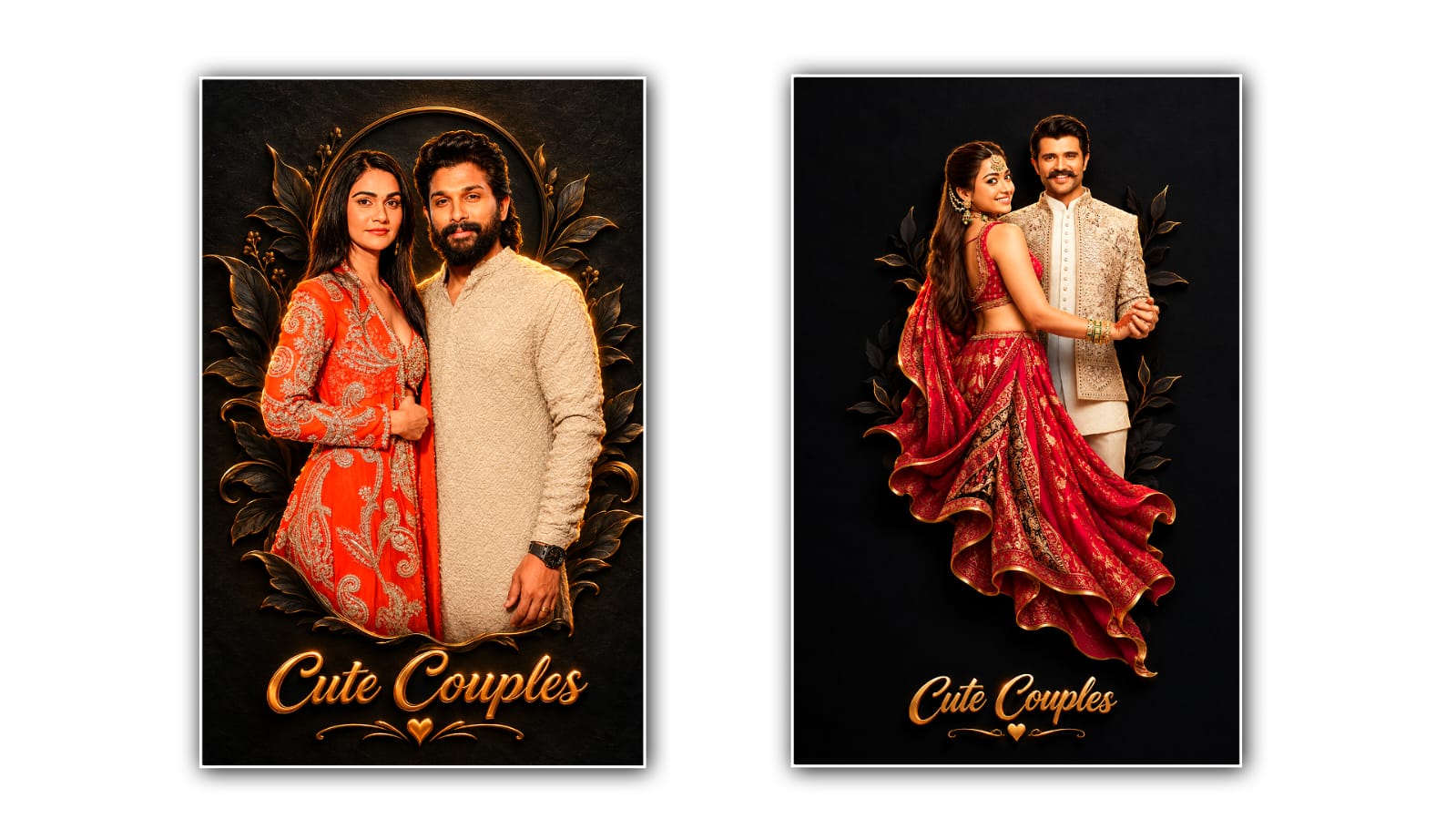

Creating a 3D cinematic couples portrait has become a popular trend among people who love stylish photography and creative photo editing. With the help of Google Gemini, you can transform an ordinary couple photo into a beautiful cinematic portrait with realistic details, dramatic lighting, attractive backgrounds, and a professional photography look. You do not need to be an expert photo editor or have expensive editing software to achieve this effect. With the right photo, a clear prompt, and a little creativity, you can create stunning couple portraits that look like they came straight from a professional photoshoot.
Google Gemini is an AI-powered tool that can help users generate and edit images based on written instructions and reference photos. Instead of spending hours adjusting colours, changing backgrounds, or adding lighting effects manually, you can describe the style you want and let the AI help you achieve the desired result. Whether you want a romantic portrait, a luxury couple photoshoot, a dreamy outdoor scene, or a dramatic movie-style image, Gemini can help you explore different creative possibilities.
The first step is to choose a good photo of the couple. For the best results, select a clear, high-quality image in which both faces are visible. A photo with natural expressions, good lighting, and minimal blur will usually work better than an image with dark faces or heavy filters. You can use a selfie, a traditional couple photograph, or a picture taken during a special occasion. Make sure both people are clearly visible so that the AI has enough visual information to understand their facial features, hairstyles, clothing, and overall appearance.
Once you have selected the photo, open Google Gemini through its official website or mobile application and sign in with your Google account if required. Look for the image upload option and add the couple photo you want to edit. Depending on the features available to your account, you may be able to upload an existing image and ask Gemini to transform it into a different visual style. Before starting, think about the final appearance you want. Having a clear idea of the background, outfits, lighting, poses, and overall mood will make it easier to write an effective prompt.
The most important part of creating a 3D cinematic couples portrait is writing a detailed prompt. A short instruction such as “make this photo cinematic” might produce an interesting result, but it may not give you enough control over the final image. Instead, explain the style, lighting, background, composition, and realistic details you want to see. You should also mention that the couple’s original facial features and identities should remain as close to the reference photo as possible.
For example, you can use a prompt like this: “Transform the uploaded couple photo into an ultra-realistic 3D cinematic portrait. Preserve both individuals’ original facial features, skin tones, hairstyles, and natural expressions. Create a romantic atmosphere with soft golden lighting, dramatic shadows, realistic skin texture, detailed eyes, and beautifully rendered hair. Add a luxurious cinematic background with a subtle depth-of-field effect, glowing highlights, and rich colours. Make the couple look naturally connected, with an elegant pose and professional photography composition. Use realistic 3D depth, high-detail textures, cinematic colour grading, and soft background blur. The final image should look polished, realistic, emotional, and suitable for a premium couple photoshoot.”
After entering the prompt, ask Gemini to generate or edit the image. The processing time and available editing options may vary depending on the tool and account features. Once the result appears, carefully examine the faces, eyes, hands, clothing, and background. AI-generated images can sometimes contain small mistakes, especially when the prompt asks for complex poses or elaborate details. If something does not look right, you do not necessarily need to start again. You can provide a follow-up instruction explaining exactly what should be corrected.
For example, if the faces look different from the original photograph, ask Gemini to preserve the couple’s facial identity more accurately while keeping the cinematic lighting and background. If the skin appears too smooth or artificial, request natural skin texture, realistic pores, and balanced lighting. If the background is too bright, ask for softer highlights and deeper cinematic shadows. Giving specific instructions generally makes the editing process easier than repeatedly asking the AI to improve the entire image without explaining what needs to change.
Lighting plays a major role in making a couple portrait look cinematic. Warm golden light can create a romantic and dreamy atmosphere, while cool blue lighting can give the image a modern movie-poster appearance. A combination of warm highlights and cooler shadows can add visual depth and make the subjects stand out from the background. You can also experiment with soft rim lighting around the couple, subtle reflections, glowing lights in the distance, and a blurred background to create the feeling of a professional studio or outdoor photoshoot.
Another way to improve the portrait is to choose a background that matches the mood of the photograph. A sunset beach can create a peaceful romantic look, while a city street filled with glowing lights can produce a stylish urban atmosphere. A luxury interior, a flower garden, a misty mountain setting, or a dramatic dark studio can also work beautifully. When writing the prompt, describe the background clearly and ask for realistic lighting that matches the environment. This helps the subjects blend naturally into the scene rather than looking like they have simply been placed on top of a different background.
Clothing and posing can also change the overall appearance of the final result. You might prefer elegant formal outfits, traditional Indian clothing, coordinated casual wear, or a fashionable cinematic look. If you want to preserve the original outfits, mention that Gemini should keep the clothing unchanged. If you want a completely new style, describe the desired colours, fabrics, and design. For example, you could request elegant black outfits with subtle highlights or traditional attire with rich colours and realistic fabric textures. It is helpful to make these choices clear before generating the image so that the final portrait matches your personal taste.
The term “3D cinematic” does not always mean that the image will be a true three-dimensional model. In photo editing, it usually refers to a strong sense of depth, realistic textures, dimensional lighting, detailed subjects, and a polished movie-like appearance. You can strengthen this effect by asking for natural facial proportions, realistic shadows, foreground and background separation, and carefully balanced colours. Avoid adding too many effects at once, because excessive glow, artificial skin, extreme sharpening, or exaggerated facial features can make the image look less realistic.
Once you are happy with the result, download the generated image using the available download option. If you plan to share it on Instagram, Facebook, WhatsApp, or another social platform, check the image dimensions and crop it according to your preferred format. A vertical composition can work well for stories and reels, while a square image may be suitable for a profile post. You can also use a separate photo-editing application for final adjustments to brightness, contrast, sharpness, or colour balance if needed. Always review the image at full size before sharing it to ensure that the faces and important details look clear.
If your first attempt does not produce the expected result, do not get discouraged. AI photo editing often requires a few experiments to achieve the right combination of realism, lighting, and composition. Try changing one part of the prompt at a time, such as the background, lighting style, pose, or level of detail. Using a clear reference photo and describing the desired result carefully can make a noticeable difference. Remember that results may vary, and some details might not be preserved perfectly in every generation.
Creating a 3D cinematic couples portrait with Google Gemini is an enjoyable way to turn an ordinary photograph into something creative and memorable. With a suitable reference image, a well-written prompt, and a few thoughtful adjustments, you can create romantic portraits with realistic depth, beautiful lighting, and a professional cinematic atmosphere. The best approach is to keep the couple’s natural appearance at the centre of the edit while experimenting with different backgrounds, colours, and visual styles. Whether you are creating a special memory, preparing a social media post, or simply exploring AI photo editing, Google Gemini offers an accessible starting point for bringing your creative ideas to life. For the best results, focus on realistic details, natural expressions, and a balanced cinematic look rather than relying on effects alone.
IMAGE PROMPT
Create a premium 3D cinematic couple portrait using the uploaded photo as the exact reference. Preserve both persons’ original faces, facial features, skin tones, hairstyles, outfits, clothing colours, jewellery, accessories, and body proportions without changes. Transform the couple into a stunning, realistic 3D relief sculpture emerging from a dark charcoal-black textured background, similar to a divine 3D statue artwork. Add elegant sculpted fabric folds, realistic depth, subtle black embossed botanical leaves, delicate golden outlines, warm cinematic rim lighting, and luxurious metallic highlights. Keep the couple centred, with their original pose and expressions recognisable. Blend the lower part of the couple naturally into flowing 3D fabric with beautiful sculptural depth. Add the exact text “Cute Couples” at the bottom in elegant, stylish, embossed metallic-gold calligraphy with a subtle glow and a small decorative golden heart flourish. Maintain balanced spacing, premium detailing, realistic shadows, and a sophisticated devotional-art-inspired 3D aesthetic. 4:5 vertical aspect ratio, high resolution, ultra-detailed, photorealistic 3D rendering. No pure flat black background, no extra people, no face changes, no outfit changes, no unwanted text, no watermark, no logo.
